
The short answer
Not automatically, no. Wi-Fi 7 is not necessary simply because it is newer. Whether it is worth it depends on your devices, how hard your network works, the router you have and your internet setup.
That is not because Wi-Fi 7 is a gimmick. It is a genuinely newer wireless standard, designed around the way busy households use the internet. The catch is that what Wi-Fi 7 improves may not be what is slowing you down. Your internet plan sets the speed that arrives at your home, and the distance, walls and number of devices inside your home shape how well that speed gets shared around.
So do you need Wi-Fi 7? It comes down to what you are actually trying to fix. If your connection feels fast in the same room as the router and fades as you move away, a newer standard is unlikely to solve that. If you have a plan with plenty of headroom, a crowded network and several devices that already support Wi-Fi 7, there is a real case for it. If those things do not describe your home, the case is much weaker.
One thing is worth settling early. Wi-Fi 7 cannot make your internet connection faster than the plan you pay for.
What Wi-Fi 7 actually changes
Wi-Fi 7 is a wireless networking standard. It describes how your devices and your router talk to each other through the air inside your home. It is not an internet connection, and it does not replace the plan you buy.
It helps to picture your router as the point where everything in the house meets, with phones, laptops, televisions, tablets and smart devices all sending their traffic through it. The Wi-Fi standard decides how efficiently the router can hand out that traffic, and how much of the available radio spectrum can be used at once. Wi-Fi 7 is designed to do more of that work at the same time, so a busy household can be served with less queuing.
It is built for busy homes rather than fast ones. The improvements are about capacity and scheduling, and about keeping the wireless link steadier when a lot of devices are active or when nearby networks compete for the same air. Those are the kinds of problems a newer standard is aimed at, and they can appear in busy homes. They are not the same problem as “my downloads are slow”.
Two limits matter here. These are capabilities of the standard, described under ideal conditions, and all of this happens on the link between your device and your router.
Wi-Fi 7, Wi-Fi 6 and older standards at a glance
| Standard | Broadly designed for | What it tends to mean at home |
|---|---|---|
| Wi-Fi 4 | Basic home use when only a few devices were online | Still works, but struggles when the house gets busy |
| Wi-Fi 5 | Faster local connections and more devices at once | Common, and often perfectly adequate |
| Wi-Fi 6 | Busier homes where many devices share the air | Handles congestion better than older standards |
| Wi-Fi 7 | Very busy homes and newer devices that can use its features | Potential improvement, limited by your devices and your plan |
The table is deliberately qualitative, because the maximum figures quoted for Wi-Fi standards describe ideal conditions rather than a real home, so treat them with caution. Marketing for any standard tends to headline a maximum number, and that number describes ideal hardware, ideal distance and nothing else using the air.
What matters for your decision is narrower. Can the devices you own use the newer standard, and is the link between those devices and your router the thing holding you back? If the answer to either is no, the standard’s theoretical capability is not going to reach you.
Why your internet speed probably will not change
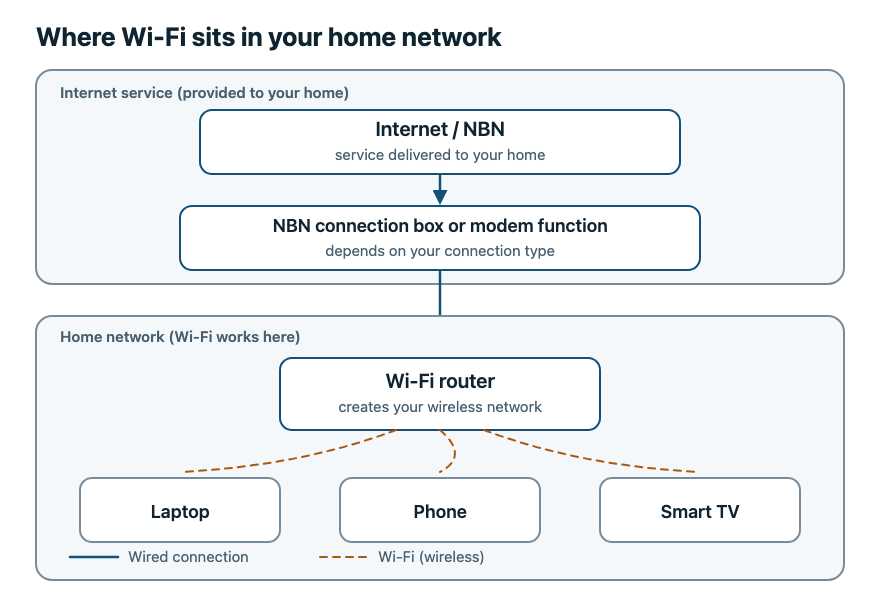
Your internet speed is set by your plan and the connection coming into your home. Your router’s job is to pass that traffic on to your devices over Wi-Fi. If the plan delivers a certain amount of speed to the house, no Wi-Fi standard can create more of it.
This is where router shopping gets confusing: the same words describe two different things. A standard’s theoretical maximum describes the wireless link under ideal conditions. Your actual speed is what your plan provides and what survives the trip across your home. Those are not the same number, and the first one is not a prediction of the second.
There is one honest exception. If your plan already delivers more speed than your current Wi-Fi setup can comfortably pass along, then the wireless link really is the bottleneck, and a newer standard can help your devices get closer to the speed you are already paying for. You would still be getting the speed your plan provides, not more than it.
To work out whether that applies to you, run a wired test that is comparable to your Wi-Fi test, ideally on the same device or on hardware with comparable networking. Make sure the cable and the router’s LAN port are not the limiting factor. If the wired result is clearly better than Wi-Fi in the same room, the wireless link is worth investigating. If wired is also slow, that suggests the issue is not Wi-Fi alone. It may involve your internet service, your router, the Ethernet cable you tested with, the router’s configuration, or the device you tested on.
What actually limits your home Wi-Fi
Real-world Wi-Fi performance is mostly decided by a handful of things, and the version number on the box often matters less than those factors.
The plan and connection you pay for
This is the ceiling for everything you do online. If the plan delivers a modest amount of speed, every device in the house shares that modest amount, however new the router is.
Distance, walls and floors
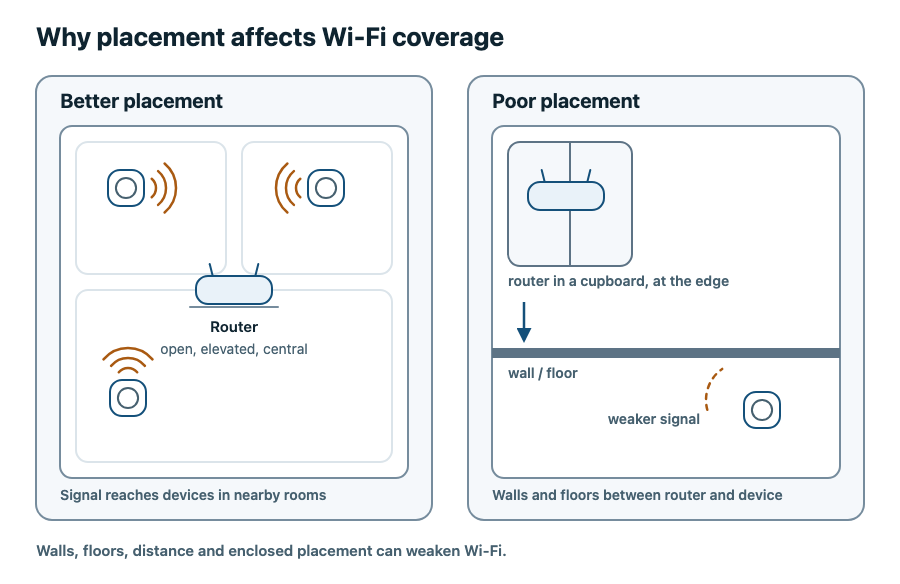
Radio signals weaken as they travel, and building materials resist them differently. Brick, concrete and foil-backed insulation are harder to pass through than plasterboard, and a floor between levels adds more distance again. That is why a connection can feel excellent in the room with the router and poor two rooms away. A newer standard does not remove walls.
How many devices are busy at once
Streaming, gaming and video calls at the same time ask a lot of a single router. Older standards have more trouble keeping everyone going at once, which can show up as lag or buffering even when the plan has headroom left.
Older devices in the mix
Every device on your network uses the standard it supports. Where devices have mixed capabilities and competing traffic, that can affect airtime efficiency and overall wireless performance, depending on the router, the devices and what they are doing. That is one reason a mixed-generation home can feel different from what a speed test suggests.
Where the router sits
Placement often matters more than people expect. A router tucked in a cupboard, hidden behind a television or pushed into a corner is working against itself, because walls, floors, distance and enclosed spaces all weaken the wireless signal. It is worth checking placement before assuming a newer standard is needed.
Do your devices support Wi-Fi 7?
This question decides most of the argument. Wi-Fi 7 features only work between a router and a device that both support them. Your router will happily serve older devices, but it cannot give them capabilities they do not have.
If you are unsure, look up the specifications of the devices you care about most, such as the phone and laptop you use every day. Manufacturer specification pages list the wireless standards a device supports, so if a device supports Wi-Fi 7 its specifications should say so. Where a device provides detailed network information, that can also tell you which network you are connected to, though not every settings screen shows the Wi-Fi generation in use.
If the devices that matter to you do not support Wi-Fi 7, you will not get the Wi-Fi 7-specific features yet. Any improvement you see would come from the router’s overall design rather than from those features. That is not a reason to avoid the standard for good, but it is a reason not to expect an immediate change.
When Wi-Fi 7 is worth considering
You are a reasonable candidate if your wired test shows the plan delivering noticeably more than Wi-Fi does in the same room. That points at the wireless link as the limit, which is exactly what a newer standard addresses.
It also makes sense in a genuinely busy home. Several people streaming, gaming or on video calls at the same time, in a house or apartment where neighbouring networks compete for the same air, is the scenario these standards are built for.
Buying a Wi-Fi 7 router is also fair enough if you were replacing a router anyway and want the newer standard in place, provided the equipment suits your internet access type and your provider’s setup. It improves the local wireless link, and it will not lift the speed arriving from your plan.
When Wi-Fi 7 is not worth it yet
If your devices cannot use it, the Wi-Fi 7-specific features will not reach you yet, because they need hardware that supports them. Your existing devices will keep working.
If your speed problem comes from the plan or the connection, a newer standard will not fix it. Replacing the router in that situation buys capability you cannot reach.
If your problem is coverage at the far end of the house, the fix is usually placement, layout or how the network is extended, not the standard the router speaks.
And if everything you do already works, there is nothing to solve. “My Wi-Fi is fine and I could keep using it” is a complete and legitimate answer. Waiting until more of your devices can use the newer standard is unlikely to cost you anything noticeable.
How to decide: a quick checklist
Work through these in order.
- Sit next to the router and run a speed test. Fast there and slow elsewhere points to coverage rather than the standard.
- Run a comparable test on a device connected by cable, accounting for any difference in the devices. If wired is much faster, the wireless link is worth improving.
- Count the devices that are busy at the same time in the evening.
- Check whether the devices you care about most list Wi-Fi 7 support.
- Ask yourself whether you were going to replace the router anyway.
- Decide whether you need Wi-Fi 7 now or would rather wait. Waiting is a reasonable answer, not a delay.
Frequently asked questions
Will Wi-Fi 7 make my internet faster?
Not on its own. Wi-Fi 7 changes how your devices talk to the router inside your home, while your plan and connection decide the speed coming in. If your wireless link was the bottleneck, a newer standard can help you get closer to the speed you already pay for.
Should I upgrade to Wi-Fi 7?
Only where the local wireless link holds you back and your devices can use the newer features. It is worth checking your router’s placement and your plan before assuming the newer standard is the answer. If your current setup keeps up with what you do, there is no urgency.
Is Wi-Fi 7 worth it for your home?
It depends far more on your home and your devices than on where you live. A busy household with a plan that outruns its Wi-Fi, and some devices that support the newer standard, has a clear case. A household where the plan is the ceiling will see very little change.
Does my internet plan support Wi-Fi 7?
Your plan and your Wi-Fi standard are separate things. The plan delivers speed to your home, and the standard governs the wireless link inside it. What you need at the wall depends on your access type and your provider’s setup. Some connections use a provider-supplied connection box with your own router plugged in by Ethernet, while others need modem functionality. A Wi-Fi 7 router is not automatically a swap-in for the equipment you have now, and the plan still sets the speed you can expect.
Will a Wi-Fi 7 router help my older devices?
It will keep serving them, but it cannot give them capabilities they do not have. Older devices connect using the standard they support. What can improve is how well the router juggles everything at once when the network is busy.
Relevant examples to explore
Editorial examples, separate from Best Sellers rankings. Within each group, products are ordered by Amazon Best Sellers position captured 17 October 2026; positions can change.
The current India catalogue has no Wi-Fi 6E example; Wi-Fi 6 and Wi-Fi 7 examples are shown.
As an Amazon Associate MetaSurge Guide earns from qualifying purchases. Check current details, price and availability on Amazon before buying. Country detection by DB-IP.
Where to go next
Still not sure which router fits your home? Answer a few questions and Find My Router will narrow it down for you.
If you have already decided to buy, you can browse current options in our list of best Wi-Fi routers.