
Your phone or computer is enough when it has a compatible output that drives your headphones cleanly at a comfortable listening level. An external DAC, amplifier or combined unit is useful when it solves a specific connection, noise or output-capability problem. It isn’t an automatic requirement for enjoying good headphones.
First separate the two jobs. A digital-to-analogue converter, or DAC, turns digital audio into an analogue signal. A headphone amplifier provides an output capable of driving the headphones. These functions may share one small device, including the circuitry behind an ordinary headphone socket.
The decision therefore isn’t whether audio needs conversion and amplification somewhere. It does. The question is whether the equipment you already use performs those jobs adequately, and whether a separate device offers a benefit worth the extra cost and complexity.
Follow the signal from source to headphones
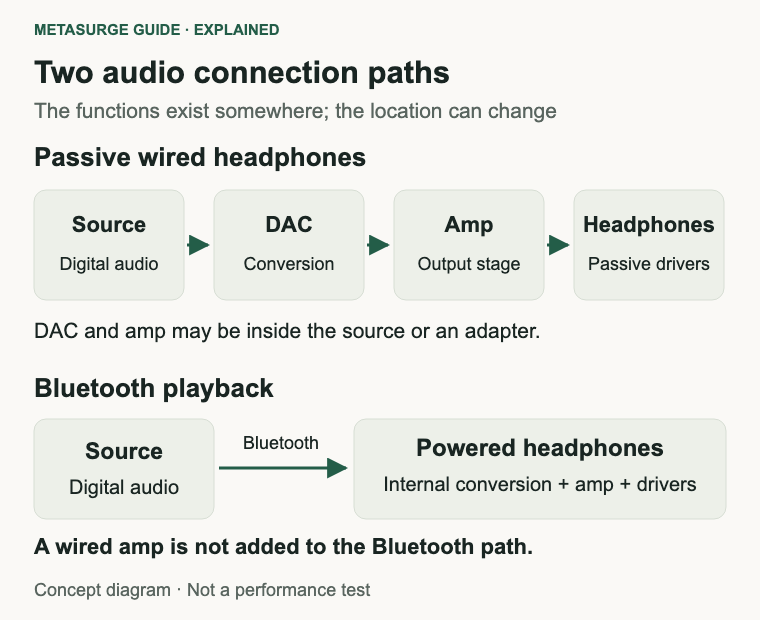
With passive wired headphones, start at the source of the audio: an application, music player, phone or computer. Digital audio must become an analogue electrical signal before the headphone drivers can turn it into sound. The conversion and output stage might be inside the source or in an attached accessory.
A headphone socket is consequently more than a hole for a plug. The device behind it includes the relevant output circuitry. Calling a computer connection “direct” doesn’t mean the headphones are operating without a DAC or amplifier; it usually means you aren’t adding an external one.
A USB audio adapter can move those jobs into a small external device. Check whether the particular adapter is an active digital audio product compatible with your source, rather than assuming every cable with USB-C and a headphone socket performs the same function.
A standalone analogue amplifier has a different role. It accepts an appropriate analogue input and provides a headphone output. It doesn’t automatically accept a digital USB connection, and a standalone DAC doesn’t necessarily include a headphone output. Read the input and output labels carefully.
Bluetooth playback follows another route. The source sends digital audio wirelessly, and powered headphones handle the conversion and output needed to drive their speakers internally. Placing a conventional wired headphone amplifier beside your phone doesn’t insert it into that wireless audio path.
Some wireless headphones also accept an analogue cable. Their behaviour with the power on or off depends on the design, including whether processing remains active. Check the exact model’s instructions; don’t assume that its wired mode is equivalent to a conventional passive headphone.
A combined USB DAC and headphone amplifier can simplify a wired setup by containing both functions. That description establishes what it does, not whether it sounds better than the existing output. Trace the complete connection before comparing equipment names.
Check what your existing output already does
Begin with the source you actually use. Look at its technical information, the output available and the headphones’ connection requirements. A phone with no analogue socket needs an appropriate connection accessory for analogue headphones, but the absence of a socket doesn’t establish a need for a large desktop unit.
For a USB accessory, confirm device compatibility, connector type and supported operation. Consider whether you need microphone input, inline controls, charging access or a particular operating system. A product that plays music successfully may still omit another function you rely on.
Check the computer or phone’s supported output before following generic advice about high-impedance headphones. Apple, for example, documents adaptive output on specified compatible Macs and says this may remove the need for an external amplifier. That applies to the listed hardware and built-in socket, not every computer or dock.
An external monitor or dock can present a different audio path from the computer’s own socket. If you hear a problem through one output, compare another supported output where available. You may be investigating the dock or adapter rather than the computer’s overall audio capability.
Use familiar recordings at a normal level. Check whether the available volume is sufficient and whether quiet sections reveal unwanted noise. Try more than one recording, because a quiet recording or an unusually loud one can distort your impression of the equipment’s capability.
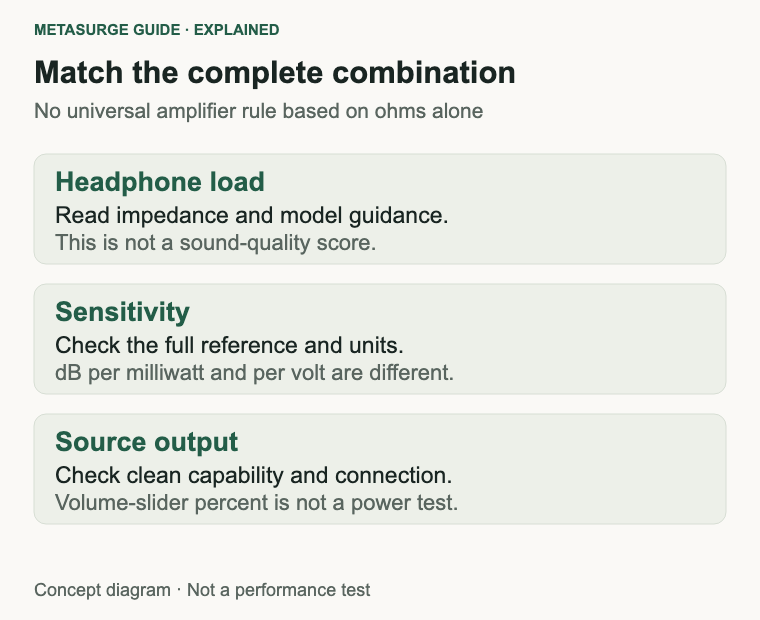
Don’t use a volume-slider percentage as a power measurement. Different devices, applications and operating modes map the slider differently. Being near the top isn’t conclusive evidence that an amplifier is inadequate, and being halfway down doesn’t establish a particular amount of clean output in reserve.
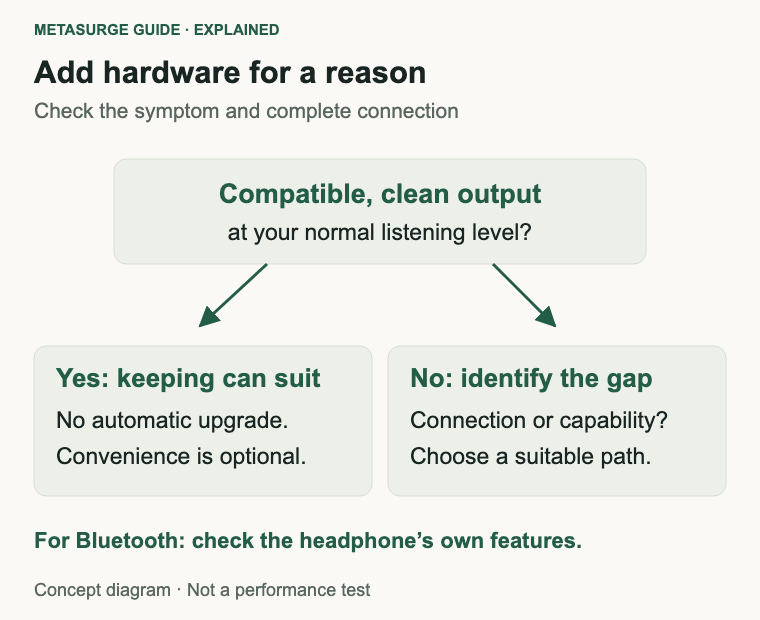
If the sound is clean and comfortably loud with the recordings and settings you use, there may be no problem to solve. An external device can still offer a convenient control knob or extra connections, but those are practical preferences rather than proof that the existing sound is deficient.
Make the keep decision deliberately. The simplest suitable setup is often easier to charge, carry and troubleshoot than a collection of accessories bought in response to a specification you haven’t linked to an actual problem.
Read impedance and sensitivity together
Impedance, shown in ohms, describes an electrical property of the headphone load. It helps characterise what the source must drive, but it isn’t a measure of sound quality and doesn’t tell you the required listening volume by itself.
Sensitivity describes the sound output obtained for a stated electrical input under stated conditions. Manufacturers may give it relative to a milliwatt or a volt. Those are different reference quantities, so comparing the bare decibel numbers without their units can be misleading.
Read the full specification and its test conditions. If two manufacturers use different references or measurement conventions, don’t treat their numbers as directly equivalent. A simple online threshold that uses only ohms can hide those differences.
The source matters as well. Its clean voltage and current capability, the headphone load and your desired listening level interact. A low impedance doesn’t guarantee that every source can drive a headphone adequately, while a higher impedance doesn’t automatically make an external amplifier mandatory.
Manufacturer guidance can be useful when it addresses the exact combination or product. Sennheiser’s support information for the HD 560 S says an external amplifier isn’t required, while allowing that some uses can benefit. That is a conditional statement, not a guarantee about every phone or a rule for every headphone.
Specifications for an amplifier also need context. A power figure is normally stated at a particular load and under particular conditions. It doesn’t mean that amount of power is always being sent to the headphones, nor that buying the largest advertised number is the right goal.
Very sensitive earphones introduce another consideration: low-level noise and usable volume control. More available power may not be the feature you need. Look for an appropriate gain range and documented behaviour for the kind of headphones you will connect.
If the specifications don’t provide a clear answer, ask the manufacturer about the exact source and headphone combination. Give the model names and describe the symptom. That is more useful than asking whether “300-ohm” or “audiophile” equipment always needs a box.
Solve the symptom before buying a box
If playback is too quiet, check the selected output, application level, system level and any relevant device setting first. Compare another normal recording. Don’t automatically disable volume-protection settings or keep raising the level to prove that the system can become louder.
An equaliser can change the gain structure. Some settings deliberately lower the overall level to accommodate adjustments without clipping. A lower level after enabling EQ can therefore require a settings check before it becomes evidence that the hardware is failing.
If you hear distortion, turn the level down and check whether the problem follows a particular recording, application or output. Digital clipping, a poor connection and a damaged headphone can produce problems that a new amplifier won’t repair.
If you hear hiss, hum or interference, compare the same headphones through another supported source where practical. Note whether the noise appears during charging, through a particular adapter or only with one device. A repeatable observation helps narrow the fault without assuming that every unwanted sound comes from the DAC.
Check the cable, plug and socket condition, and ensure the connection is fully seated as the manufacturer directs. A loose or incompatible connection can create missing channels or unusual sound. Another box adds more connections, so it isn’t a substitute for checking the existing ones.
For a USB device, verify that the operating system and application have selected it as the output. Conference apps can retain their own audio choices. If the microphone stops working, check whether the new device actually supports the required input rather than assuming the headphone socket carries it.
An external audio interface can be sensible when you also need recording inputs or several controlled outputs. That is a different purchase brief from fixing headphone volume alone. Decide which functions are necessary before choosing between a small adapter, a headphone unit and recording equipment.
After each change, repeat the same short listening check. Change one thing at a time and keep the volume comfortable. The useful result is a resolved symptom or a clear practical benefit, not the largest pile of components that can be connected.
Choose the simplest complete connection
If you’re using Bluetooth headphones and are satisfied with the result, keep that path. An external wired DAC and amplifier are relevant only if you intend to use a compatible wired connection or another arrangement that actually includes them.
If your source lacks a headphone socket, start by finding a compatible output solution for the headphones and features you need. Check connector, operating-system support and microphone requirements. Size and portability can matter more than a long list of supported file formats.
If an existing analogue output is genuinely inadequate for the intended headphones, compare an amplifier or combined unit against that requirement. Check gain choices, output capability at an appropriate load and the required cable. A standalone amplifier also needs a suitable analogue source.
For a fixed desk, think about everyday controls. A physical volume knob, accessible socket or convenient switching can justify a device even when the existing output sounds adequate. Be clear that you are paying for usability, rather than claiming an audible change you haven’t established.
For portable use, include the added cable, battery or power draw in the decision. A technically capable accessory may be inconvenient on public transport or while charging the phone. Test the complete arrangement rather than evaluating the audio device in isolation.
Treat balanced outputs as a specific connection design. They can require an appropriate headphone cable and may offer different output capability, but the label doesn’t guarantee a better listening result. Don’t improvise adapters between incompatible outputs or connect headphones to speaker-amplifier terminals.
If you can compare two working setups, use the same recording and broadly similar perceived loudness. Differences in equalisation, processing or volume can otherwise dominate the impression. You don’t need to claim a laboratory comparison to decide whether you prefer using one setup.
Buy when the device solves a demonstrated problem or adds a function you value. Keep the present setup when it already meets the requirement. Higher supported sample rates, a premium enclosure and a large power number don’t create an automatic reason to replace a suitable output.
Frequently asked questions
Does my phone already have a DAC?
Audio needs conversion somewhere before a conventional driver produces sound. With a built-in analogue socket, the relevant circuitry is in the phone. With an active USB audio adapter it can be in the adapter, and during Bluetooth playback it is handled within the powered headphones.
Do high-impedance headphones always need an external amp?
No. Read sensitivity alongside impedance and check the source’s output capability. Some compatible computers have capable built-in outputs. The useful question is whether the exact combination works cleanly at your intended level.
Will a DAC make Bluetooth headphones sound better?
A separate wired DAC isn’t normally in the Bluetooth playback path. It becomes relevant only when your chosen connection actually routes audio through it. Check wired-mode support separately.
Can a combined DAC and amp replace both boxes?
Yes, when it provides the input, headphone output and compatibility you need. Combining functions can simplify the setup. It doesn’t establish an improvement over your existing output without a relevant problem or a comparison.
Relevant examples to explore
Editorial examples, separate from Best Sellers rankings. Within each group, products are ordered by Amazon Best Sellers position captured 17 October 2026; positions can change.
As an Amazon Associate MetaSurge Guide earns from qualifying purchases. Check current details, price and availability on Amazon before buying. Country detection by DB-IP.
Sources and editorial approach
Technical context uses Apple’s output guidance, Sennheiser’s conditional amplifier advice, Benchmark Media’s sensitivity explanation and RME’s output-stage documentation. Sources were checked on 16 October 2026. Signal paths and troubleshooting steps are editorial explanations; no output measurements, listening tests or guaranteed sound improvements are claimed.
Where to go next
Explore the On-Ear / Over-Ear Headphones guide once you know the connection you want to use. The separate headphone examples illustrate different requirements; keep a suitable existing pair and confirm source compatibility before adding an accessory.