
Key rollover is the number of keys a keyboard can register at the same time. Ghosting is a related fault where a key you did not press appears because of the way the key matrix is wired. For ordinary typing, most keyboards are fine. For fast games, complex shortcuts or deliberate multi-key testing, the difference can matter.
The useful distinction is between a limit and a fault. A keyboard that reliably reports six simultaneous keys is not broken; it is working to a specification. A keyboard that reports a key you never touched, or drops a key in a common combination, has a matrix or firmware limitation worth understanding before you replace it.
Rollover, ghosting and the keyboard matrix
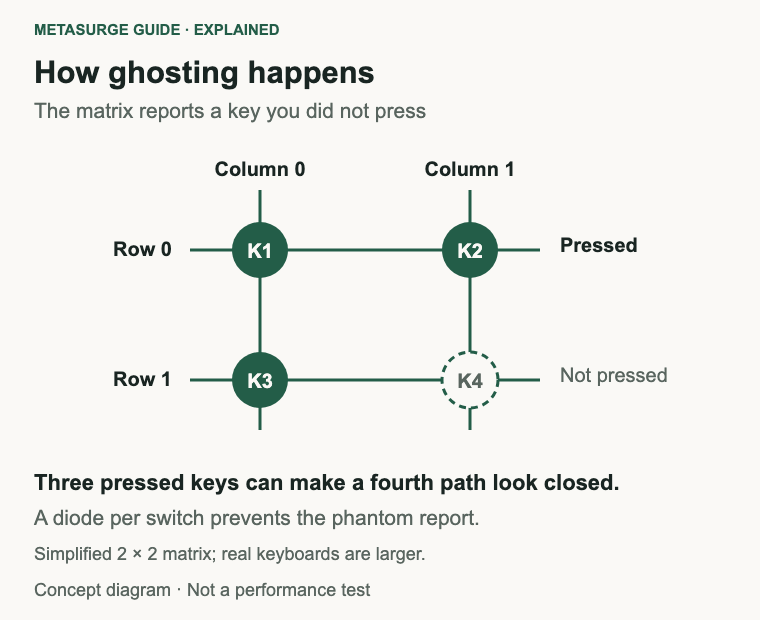
Most keyboards arrange their switches in rows and columns. The controller scans the columns one at a time and reads the rows to work out which switches are closed. QMK’s explanation of a keyboard matrix shows why this saves wiring: without a matrix, every switch would need its own connection to the controller.
The matrix also explains ghosting. If three keys form three corners of a rectangle in the row-and-column grid, the electrical path can look like the fourth corner is pressed as well. The controller then reports a key that is not actually down. QMK describes this as ghosting and notes that it becomes more likely on larger keyboards, where more keys share rows and columns.
A diode placed in series with each switch stops current flowing backwards through the matrix, which prevents the phantom key. Many mechanical keyboards use a diode per switch for this reason. A keyboard without diodes can still work well for normal typing; the limitation only appears in specific combinations.
Rollover is the other side of the story. It describes how many simultaneous key presses the keyboard can report reliably. You may see terms such as 2-key rollover, 6-key rollover or N-key rollover. Those numbers are not a measure of build quality. They describe a designed limit, and the practical effect depends on which keys you press together.
The scanning method also affects how the limit feels. If the controller scans columns in sequence and the report can hold only a few keycodes, a fast sequence of presses can overlap with the scan. A keyboard with a larger report and a better matrix can keep track of those overlaps. This is why two keyboards with similar switches can behave differently when you press several keys in quick succession.
Why six keys appear in a USB keyboard report
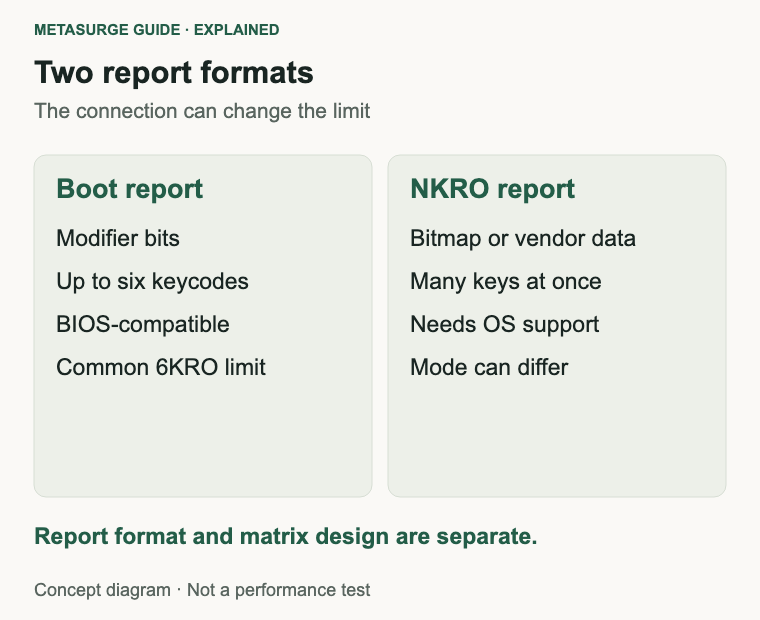
The USB HID specification defines a boot-protocol keyboard report that carries modifier bits and up to six keycodes. That format exists so a keyboard can work in a BIOS, a boot menu or another limited environment without a custom driver. It is the reason a keyboard may be described as six-key rollover even when its matrix could detect more.
Outside the boot protocol, a keyboard can use a larger report. N-key rollover implementations often send a bitmap of key states or a vendor-specific report, allowing many keys to be reported at once. The operating system and the application still have to read that report correctly.
This is why the same keyboard can behave differently in different situations. A keyboard with N-key rollover may fall back to a six-key report in a BIOS or through a KVM switch. A Bluetooth connection may expose a different report format from a wired USB connection. A cheap USB adapter can also change what the computer sees.
Polling rate is a separate specification. It describes how often the keyboard reports its state, not how many keys fit in a report. A high polling rate does not automatically mean N-key rollover, and N-key rollover does not guarantee a particular polling rate.
What NKRO and anti-ghosting actually promise
N-key rollover, usually shortened to NKRO, generally means the keyboard can report any combination of keys without dropping one because of the matrix. The exact promise depends on the implementation: some keyboards support NKRO in USB mode but not over Bluetooth, and some require a toggle or a particular report mode.
Anti-ghosting is a marketing term rather than a standardised specification. It may mean the keyboard has diodes, that certain key combinations are tested to work, or that the firmware filters phantom keys. Two keyboards labelled anti-ghosting can behave differently. The label alone does not tell you how many simultaneous keys are supported or which combinations are guaranteed.
Switch type does not settle the question either. A mechanical switch can sit in a matrix without diodes, and a membrane keyboard can use a matrix designed to avoid common ghosting combinations. The matrix design and the firmware matter more than the switch category.
Connection and software add another layer. Wireless modes, hubs, KVMs and adapters can restrict the report format. Some games read keyboard state through a different interface from a text editor, and some applications deliberately limit the number of keys they track. If a combination fails in one program but works in another, the keyboard may not be the cause.
When key rollover matters in practice
Fast typing is the least demanding case. A touch typist may overlap two or three keys during a quick sequence, but rarely holds six letters at once. A six-key rollover keyboard is usually sufficient for ordinary typing, even at high speed. If letters drop during normal typing, a matrix limit is an unlikely explanation; a failing switch, a software filter or a connection problem is more likely.
Games are the usual reason people care. A player may hold a movement key, a sprint key, a crouch key and a fire key while pressing a jump or reload key. That can approach or exceed a six-key limit, especially when modifiers are involved. N-key rollover gives more headroom, but it does not guarantee that a particular game will read every key.
Think about the combinations you actually use rather than the theoretical maximum. A player who holds forward and left, taps crouch and jumps, and uses a voice-chat shortcut is pressing more keys than someone playing a turn-based game. A simulation with dozens of bindings can be even more demanding. Writing down the busiest moment in your own game or application is more useful than comparing rollover numbers in the abstract.
Some genres push harder than others. Fighting games, rhythm games and simulations can require several simultaneous inputs or rapid sequences. Competitive players may also use keyboards with high polling rates and low-latency connections. Those features can matter, but they are separate from rollover.
Keyboard shortcuts are a different case. Ctrl, Shift and Alt are modifiers, and they are reported separately from the six keycodes in the boot protocol. A shortcut like Ctrl+Shift+S is not usually a rollover problem. If a shortcut fails, check the application’s key bindings, the operating system’s keyboard layout and any macro software before blaming the matrix.
Ghosting is rarer in normal use because it needs a specific geometric pattern of pressed keys. When it happens, the symptom is distinctive: a character or action appears that you did not press. If you can reproduce it with the same three keys every time, the matrix is a plausible explanation. If it happens randomly with different keys, look at the connection, the software and the switch itself.
Check your keyboard before replacing it
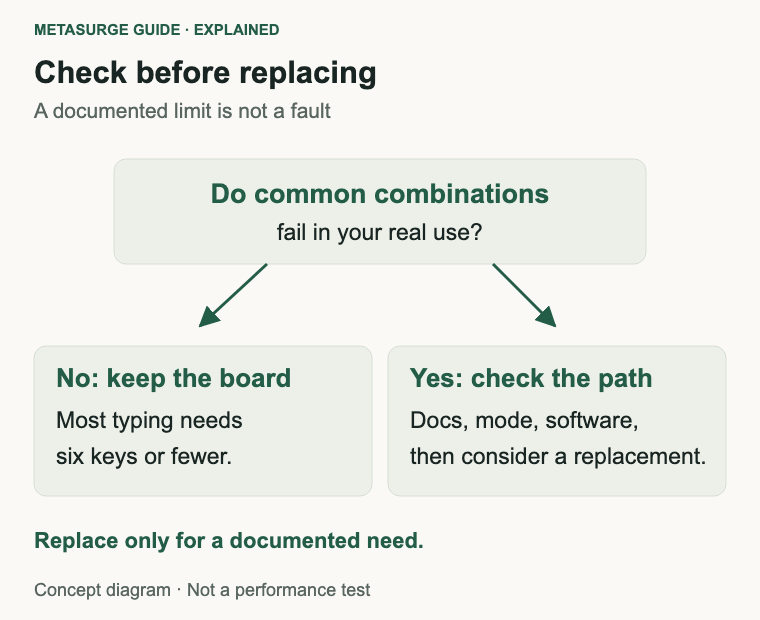
Start with the documentation for your exact model. Look for terms such as N-key rollover, 6KRO, anti-ghosting or a rollover specification, and note whether the claim applies to USB, Bluetooth or both. A product page that says “anti-ghosting” without a number is not enough to settle a specific combination question.
Check the connection. Try the same combination over a wired USB connection and, if the keyboard supports it, over wireless. Try a different port and, if you use one, remove a hub, KVM or adapter from the path. If the behaviour changes, the keyboard’s matrix may be fine and the report path may be the limit.
Check the software. Look for a rollover or NKRO toggle in the keyboard’s software, and confirm that a firmware update has not changed the default mode. On the computer, check accessibility settings such as Filter Keys, which can affect repeated or brief input, and check the application’s own key bindings.
Test safely. A text editor can show whether a combination produces the characters you expect, and a game’s input settings can show whether it recognises the keys. Avoid online tester pages that ask you to type sensitive information, and remember that a browser may not receive every key even when the keyboard sends it.
If you need N-key rollover, choose a keyboard that documents it for the connection you will use. A wired USB keyboard with a diode matrix and supported firmware is the least ambiguous option. A wireless board may still support NKRO, but check the exact mode rather than assuming.
Do not open the keyboard or attempt a diode modification on the basis of a forum post. The modification is model-specific, can damage the board and may void the warranty. If the keyboard is under warranty and a common combination fails, ask the manufacturer whether the behaviour is expected.
If the keyboard is out of warranty and a documented limitation is the only problem, a replacement can be justified, but only if the new model actually documents the behaviour you need. Moving to another keyboard with the same six-key report and no diodes would not solve anything. Compare the exact specification for the connection you use, not just the gaming label.
Frequently asked questions
What is the difference between ghosting and rollover?
Ghosting is a false key report caused by the matrix. Rollover is the number of simultaneous keys the keyboard can report. A keyboard can have good rollover and still ghost in a specific combination if its matrix lacks diodes.
Do I need N-key rollover for typing?
Most typists do not. Six-key rollover is usually enough for normal typing, and a dropped letter is more likely to be a switch or software issue. N-key rollover matters more for games and deliberate multi-key input.
Why does my keyboard fail when I press three keys?
It may be a matrix limitation, a report-format limit or a software conflict. Check whether the same combination fails in another application and over another connection. If it is consistent and the model documents the limit, the keyboard is behaving as designed.
Does a mechanical keyboard guarantee N-key rollover?
No. Rollover depends on the matrix, the diodes and the firmware, not on the switch type alone. Some mechanical keyboards support NKRO; others use a more limited report. Check the exact model’s documentation.
Relevant examples to explore
Editorial examples, separate from Best Sellers rankings. Within each group, products are ordered by Amazon Best Sellers position captured 17 October 2026; positions can change.
As an Amazon Associate MetaSurge Guide earns from qualifying purchases. Check current details, price and availability on Amazon before buying. Country detection by DB-IP.
Sources and editorial approach
This guide uses QMK’s explanation of how a keyboard matrix works, QMK’s description of how keys are registered and interpreted, the USB HID 1.11 specification for the boot-protocol keyboard report, and manufacturer documentation for the Keychron R6 and Logitech MX Mechanical, checked on 17 October 2026. No measured rollover counts, polling rates or game-performance tests are claimed.
Where to go next
Browse the Keyboards guide to compare documented rollover, connection modes and firmware support. If a specific combination matters to you, check the exact model’s documentation and test it in the application you actually use.